
Getting Started: Manage Space
Purpose
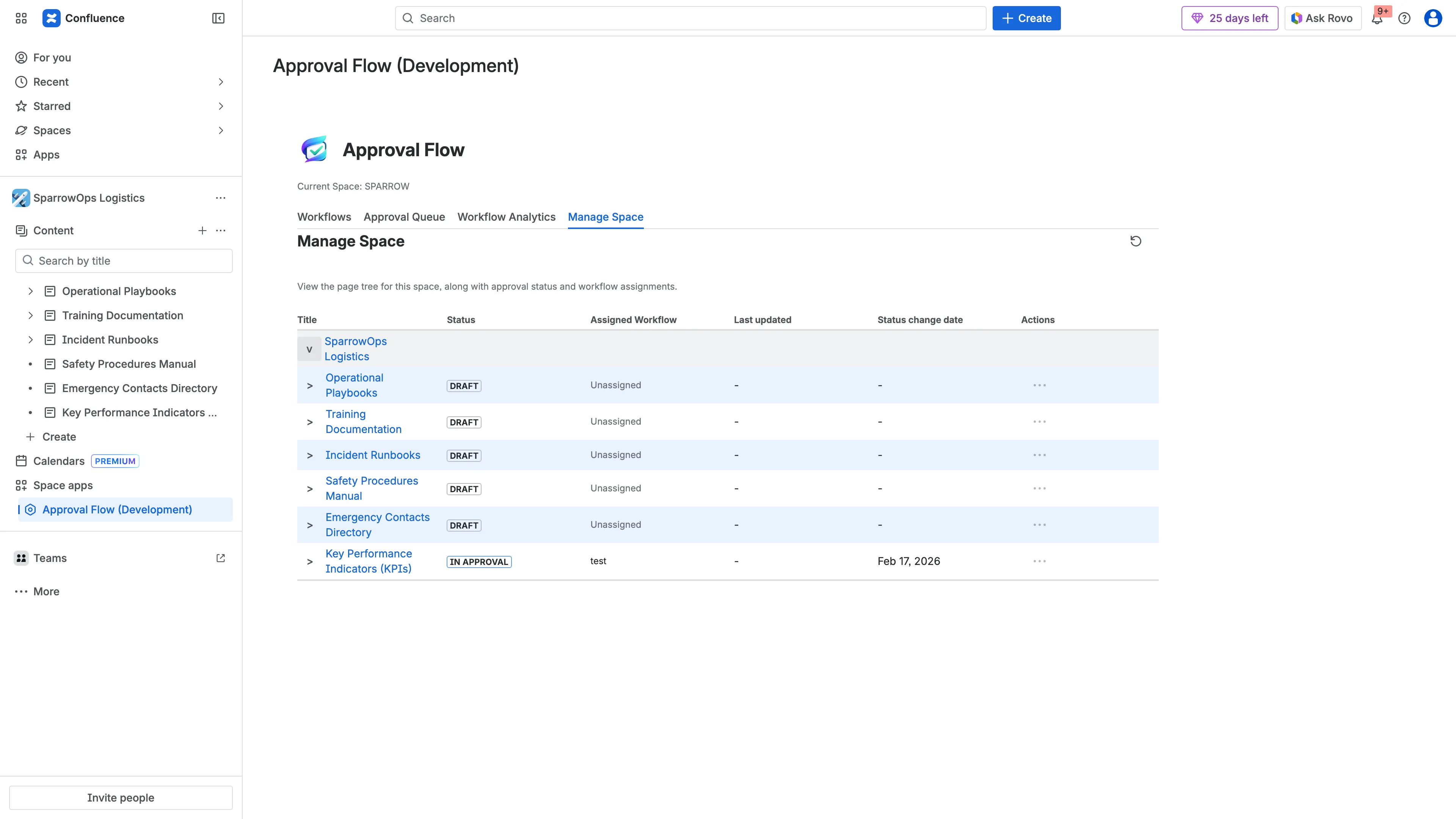
Section titled “Purpose”Manage Space is the space administrator view for applying ApprovalFlow governance to an existing Confluence page tree. It helps admins answer three practical questions:
- Which pages already have an approval workflow assigned?
- Which pages are in draft, in approval, approved, or changes-requested state?
- Where does an admin need to assign, reassign, or reset workflow state before a team can rely on Approval Queue and analytics?
What You Can See
Section titled “What You Can See”- Space hierarchy.
- Current approval status tags (
Draft,In Approval, etc.). - Assigned workflow.
- Status change date.
- Row actions column (
...) for assignment/approval operations when available.
Common Admin Workflows
Section titled “Common Admin Workflows”Assign a workflow to existing pages
Section titled “Assign a workflow to existing pages”Use this path when a space already contains policy pages, SOPs, product docs, or knowledge-base articles and you want ApprovalFlow to govern them going forward.
- Open the
Manage Spacetab from the ApprovalFlow space dashboard. - Expand the relevant page tree branch.
- Find pages with no assigned workflow or with the wrong workflow.
- Open the row actions menu (
...) for the page. - Choose the workflow that should govern future submissions for that page.
- Ask the page owner to submit the current version from the byline when review is required.
Reassign a page after workflow changes
Section titled “Reassign a page after workflow changes”Use reassignment when a page moves into a different governance category, such as lightweight peer review versus formal compliance approval.
- Confirm the destination workflow exists and is enabled in Workflows.
- Reassign from the row actions menu.
- Check the byline on the Confluence page to confirm the page now reflects the intended workflow context.
- For pages already in review, check Approval Queue before changing assignment so reviewers understand the current pending state.
Reset approval state
Section titled “Reset approval state”Use reset only when the stored state is no longer the state your team wants to rely on, such as after a test rollout, incorrect workflow assignment, or space cleanup.
- Resetting clears the approval state for that page.
- Historical comments and Confluence page history remain in Confluence.
- New submissions create fresh ApprovalFlow records tied to the current page version.
- Use reset intentionally; it affects what appears in queue and analytics views.
Permissions and Row Actions
Section titled “Permissions and Row Actions”Row action availability depends on page status, assignment state, and the current user’s permissions. Space admins can manage workflow assignment for the space. Workflow owners can manage workflows they own. Reviewers and authors can still use byline actions for submissions and decisions, but they do not receive every administrative row action in Manage Space.
If a row action is missing:
- Confirm you are a Confluence space admin or workflow owner.
- Confirm the target workflow is enabled.
- Confirm the page has loaded in the expanded tree branch.
- Refresh the dashboard if a workflow was just created or disabled in another tab.
Relationship to Queue, Analytics, and Change Sets
Section titled “Relationship to Queue, Analytics, and Change Sets”Manage Space controls page-to-workflow assignment and administrative resets. It is not the main reviewer inbox.
- Use Approval Queue to review pending, approved, and rejected approval records.
- Use Workflow Analytics to inspect approval outcomes and trends.
- Use Change Sets when several pages should be submitted as one coordinated review bundle.
Troubleshooting
Section titled “Troubleshooting”| Symptom | What to check |
|---|---|
| Page is missing from the tree | Expand the parent branch and confirm the page exists in the current Confluence space. |
| Assigned workflow looks stale | Refresh the dashboard and confirm the workflow is still enabled in Workflows. |
| Row actions are not visible | Confirm space-admin or workflow-owner permission. |
| Queue does not show the page | Confirm the page has been submitted for approval from the byline after assignment. |
| Analytics totals look unexpected | Check whether the page was reset or reassigned before the reporting window. |
Manage Spaceis most useful during rollout, migration, and periodic governance cleanup.- For day-to-day approvals, reviewers should use the byline and Approval Queue.
- For audit context, combine
Manage Spaceassignment details with Approval Queue records, Confluence comments, and page version history.